
27.4 数据集格式与工具
TRL 的各训练器对输入数据的格式有严格要求——格式不对,训练直接报错。本节系统梳理 TRL 支持的数据格式(Format)和数据类型(Type),建立"数据类型 - 训练器"的完整对应关系,并介绍内置的格式转换工具,帮助读者在实际项目中高效准备训练数据。
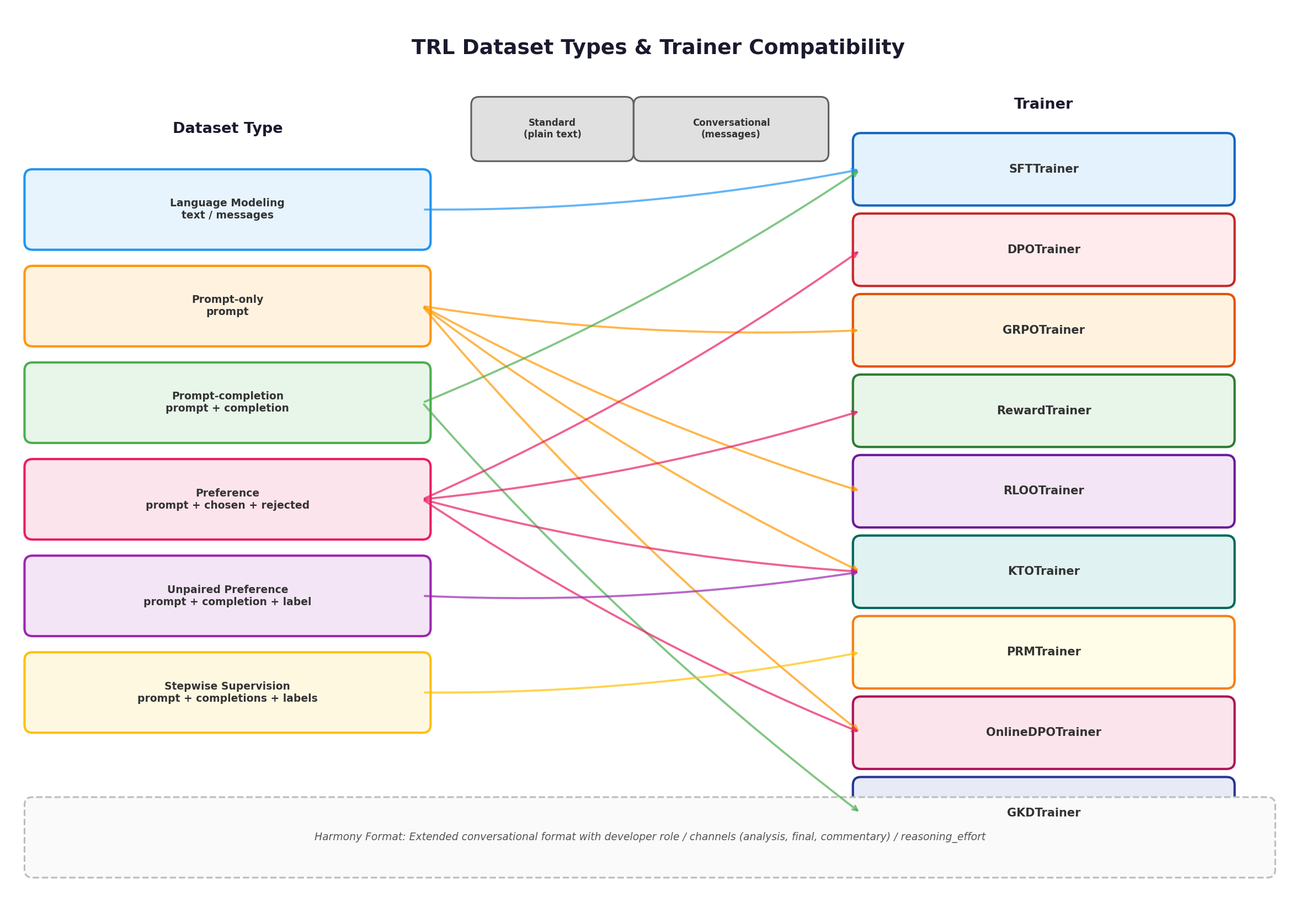
一、两个核心维度:格式与类型
在 TRL 的数据体系中,**格式(Format)和类型(Type)**是两个正交的维度:
- 格式决定数据的"外观"——是纯文本字符串(Standard,标准格式)还是结构化的消息列表(Conversational,对话格式)。
- 类型决定数据的"用途"——是用于语言建模、偏好对齐还是过程监督,每种类型有特定的列名要求。
两者的组合构成了下表所示的完整矩阵:
| 类型 | Standard 格式示例 | Conversational 格式示例 |
|---|---|---|
| Language modeling | {"text": "The sky is blue."} | {"messages": [{"role": "user", "content": "..."}, {"role": "assistant", "content": "..."}]} |
| Prompt-only | {"prompt": "The sky is"} | {"prompt": [{"role": "user", "content": "..."}]} |
| Prompt-completion | {"prompt": "The sky is", "completion": " blue."} | {"prompt": [...], "completion": [...]} |
| Preference | {"prompt": "...", "chosen": "...", "rejected": "..."} | {"prompt": [...], "chosen": [...], "rejected": [...]} |
| Unpaired preference | {"prompt": "...", "completion": "...", "label": true} | {"prompt": [...], "completion": [...], "label": false} |
| Stepwise supervision | {"prompt": "...", "completions": [...], "labels": [...]} | —(仅支持标准格式) |
二、Standard 格式:纯文本字段
Standard(标准)格式是 TRL 训练器的"原生语言"——所有数据最终都会被转为这种形式送入模型。每条样本由一个或多个纯文本字段组成,字段名因类型而异:
# Language modeling —— 单字段 "text"
{"text": "The sky is blue."}

# Prompt-only —— 单字段 "prompt"
{"prompt": "The sky is"}

# Prompt-completion —— 两字段
{"prompt": "The sky is", "completion": " blue."}

# Preference —— 三字段(显式 prompt,推荐)
{"prompt": "The sky is", "chosen": " blue.", "rejected": " green."}

# Preference —— 两字段(隐式 prompt,chosen/rejected 包含完整文本)
{"chosen": "The sky is blue.", "rejected": "The sky is green."}

# Unpaired preference —— 三字段 + 布尔标签
{"prompt": "The sky is", "completion": " blue.", "label": True}
Standard 格式的优点是简单直观、零序列化开销,适合纯文本预训练或续写类任务。
三、Conversational 格式:消息列表
对话(Conversational)格式适用于对话模型的微调场景。与 Standard 格式不同,这里的每个字段值不再是纯文本字符串,而是由 role(角色)和 content(内容)组成的消息列表:
# 一条对话消息列表
messages = [
    {"role": "user", "content": "Hello, how are you?"},
    {"role": "assistant", "content": "I'm doing great. How can I help you today?"},
    {"role": "user", "content": "I'd like to show off how chat templating works!"},
]
对话格式会经过模型的 chat template(聊天模板)处理,自动添加特殊标记(如 <|user|>、<|assistant|> 等),生成模型所需的最终输入序列。不同类型的数据在对话格式下的写法:
# Language modeling(对话格式)
{"messages": [
    {"role": "user", "content": "What color is the sky?"},
    {"role": "assistant", "content": "It is blue."}
]}

# Prompt-completion(对话格式)
{"prompt": [{"role": "user", "content": "What color is the sky?"}],
 "completion": [{"role": "assistant", "content": "It is blue."}]}

# Preference(对话格式,显式 prompt)
{"prompt": [{"role": "user", "content": "What color is the sky?"}],
 "chosen": [{"role": "assistant", "content": "It is blue."}],
 "rejected": [{"role": "assistant", "content": "It is green."}]}
Prompt-only 与 Language modeling 的关键区别
这两种类型在对话格式下看起来很相似,但 TRL 对它们的处理截然不同。以 Phi-3 模型为例:
pythonfrom transformers import AutoTokenizer from trl import apply_chat_template tokenizer = AutoTokenizer.from_pretrained("microsoft/Phi-3-mini-128k-instruct") # Prompt-only:输出以 <|assistant|>\n 结尾,等待模型续写 prompt_only = {"prompt": [{"role": "user", "content": "What color is the sky?"}]} apply_chat_template(prompt_only, tokenizer) # => {'prompt': '<|user|>\nWhat color is the sky?<|end|>\n<|assistant|>\n'} # Language modeling:输出以 <|endoftext|> 结尾,表示完整序列 lm = {"messages": [{"role": "user", "content": "What color is the sky?"}]} apply_chat_template(lm, tokenizer) # => {'text': '<|user|>\nWhat color is the sky?<|end|>\n<|endoftext|>'}Prompt-only 末尾的
<|assistant|>\n信号告诉模型"该你回答了",而 Language modeling 的<|endoftext|>表示"序列到此为止"。选错类型会导致模型行为异常。
四、Tool Calling 格式:函数调用数据
部分聊天模板支持工具调用(Tool Calling),允许模型在生成过程中调用外部函数。工具调用格式在对话格式的基础上新增了两个要素:
- 助手消息中的
tool_calls字段(取代content),包含函数名和参数。 - 数据集中额外的
tools列,定义可用工具的 JSON Schema。
一条完整的工具调用对话示例:
messages = [
    {"role": "user", "content": "Turn on the living room lights."},
    {"role": "assistant", "tool_calls": [
        {"type": "function", "function": {
            "name": "control_light",
            "arguments": {"room": "living room", "state": "on"}
        }}
    ]},
    {"role": "tool", "name": "control_light",
     "content": "The lights in the living room are now on."},
    {"role": "assistant", "content": "Done!"}
]
工具的 JSON Schema 可以从 Python 函数签名自动生成:
from transformers.utils import get_json_schema

def control_light(room: str, state: str) -> str:
    """
    Controls the lights in a room.

    Args:
        room: The name of the room.
        state: The desired state of the light ("on" or "off").

    Returns:
        str: A message indicating the new state of the lights.
    """
    return f"The lights in {room} are now {state}."

# 自动生成 JSON Schema
json_schema = get_json_schema(control_light)
# 输出:{"type": "function", "function": {"name": "control_light", ...}}
组装完整的 SFT 训练数据集:
from datasets import Dataset

data = [
    {"messages": messages, "tools": [json_schema]},
    # ... 更多样本
]

# 使用 on_mixed_types 自动处理 JSON 类型
dataset = Dataset.from_list(data, on_mixed_types="use_json")
如果使用的
datasets版本低于 4.7.0(不支持Json()类型),需要将tools字段序列化为 JSON 字符串:pythonimport json dataset = Dataset.from_list([ {"messages": messages, "tools": json.dumps([json_schema])} ])
五、Harmony 格式:OpenAI 扩展对话
Harmony 是 OpenAI 随 GPT OSS 模型引入的扩展对话格式,在标准对话格式之上增加了更丰富的结构化信息。其核心扩展点包括:
| 特性 | 说明 |
|---|---|
| developer 角色 | 类似 system prompt,提供高层指令和可用工具列表 |
| Channels(通道) | 将助手输出分流为 analysis(内部推理,对应 thinking 字段)、final(面向用户的回答,对应 content 字段)、commentary(工具调用或元注释) |
| Reasoning effort | 控制模型展示推理过程的程度:"low"、"medium"、"high" |
| Model identity | 显式定义助手的人设 |
使用示例:
from transformers import AutoTokenizer

tokenizer = AutoTokenizer.from_pretrained("openai/gpt-oss-20b")

messages = [
    {"role": "developer", "content": "Use a friendly tone."},
    {"role": "user", "content": "What is the meaning of life?"},
    {"role": "assistant", "thinking": "Deep reflection...",
     "content": "The final answer is..."},
]

output = tokenizer.apply_chat_template(
    messages,
    tokenize=False,
    reasoning_effort="low",
    model_identity="You are HuggingGPT, a large language model trained by Hugging Face.",
)模板渲染后的文本包含显式的通道标记(<|channel|>analysis、<|channel|>final),模型可以据此区分内部推理和最终回答。Harmony 格式目前主要用于支持 OpenAI GPT OSS 系列模型的 SFT 训练。
六、各数据类型详解
6.1 Language Modeling(语言建模)
语言建模数据集是最简单的类型,包含单一的 text(Standard)或 messages(Conversational)列,代表一段完整的文本序列。
# Standard
{"text": "The sky is blue."}
# Conversational
{"messages": [{"role": "user", "content": "What color is the sky?"},
{"role": "assistant", "content": "It is blue."}]}适用训练器:SFTTrainer
6.2 Prompt-only(仅提示)
仅包含 prompt 字段,用于在线强化学习场景——模型根据 prompt 生成回复,由奖励模型或奖励函数评判质量。
# Standard
{"prompt": "The sky is"}
# Conversational
{"prompt": [{"role": "user", "content": "What color is the sky?"}]}适用训练器:GRPOTrainer、RLOOTrainer、OnlineDPOTrainer、NashMDTrainer、XPOTrainer
6.3 Prompt-completion(提示-补全)
同时包含 prompt 和 completion 字段,用于监督微调——模型只在 completion 部分计算损失。
# Standard
{"prompt": "The sky is", "completion": " blue."}
# Conversational
{"prompt": [{"role": "user", "content": "What color is the sky?"}],
"completion": [{"role": "assistant", "content": "It is blue."}]}适用训练器:SFTTrainer、GKDTrainer
6.4 Preference(偏好)
偏好数据集包含 prompt、chosen(优选回答)和 rejected(劣选回答)三个字段,用于训练模型区分回答质量。推荐使用显式 prompt(prompt 单独成列),也支持隐式 prompt(prompt 嵌入 chosen/rejected 中)。
# 显式 prompt(推荐)
{"prompt": "The sky is",
 "chosen": " blue.",
 "rejected": " green."}

# 隐式 prompt
{"chosen": "The sky is blue.",
"rejected": "The sky is green."}适用训练器:DPOTrainer(推荐显式 prompt)、RewardTrainer(推荐隐式 prompt)、KTOTrainer、ORPOTrainer、CPOTrainer、BCOTrainer
6.5 Unpaired Preference(非配对偏好)
与 Preference 不同,非配对偏好数据集中每条样本只有一个 completion 和一个布尔 label,标记该回答是"好"还是"坏"。这种格式不要求同一 prompt 同时有优劣配对。
# Standard
{"prompt": "The sky is", "completion": " blue.", "label": True}
# Conversational
{"prompt": [{"role": "user", "content": "What color is the sky?"}],
 "completion": [{"role": "assistant", "content": "It is green."}],
"label": False}适用训练器:KTOTrainer、BCOTrainer
6.6 Stepwise Supervision(步骤监督)
步骤监督数据集用于过程奖励模型(PRM)训练。每条样本包含 prompt、completions(推理步骤列表)和 labels(每步的正确性标签列表),允许模型在每一步获得独立的监督信号。
{"prompt": "Which number is larger, 9.8 or 9.11?",
 "completions": [
     "The fractional part of 9.8 is 0.8.",
     "The fractional part of 9.11 is 0.11.",
     "0.11 is greater than 0.8.",
     "Hence, 9.11 > 9.8."
 ],
"labels": [True, True, False, False]}适用训练器:PRMTrainer
七、数据类型与训练器对照表
下表汇总了 TRL 中所有训练器及其期望的数据类型,是数据准备的核心参考:
| 训练器 | 期望数据类型 | 关键字段 |
|---|---|---|
| SFTTrainer | Language modeling / Prompt-completion | text 或 messages / prompt + completion |
| DPOTrainer | Preference(推荐显式 prompt) | prompt + chosen + rejected |
| GRPOTrainer | Prompt-only | prompt |
| RewardTrainer | Preference(推荐隐式 prompt) | chosen + rejected |
| RLOOTrainer | Prompt-only | prompt |
| KTOTrainer | Unpaired preference / Preference | prompt + completion + label |
| BCOTrainer | Unpaired preference / Preference | prompt + completion + label |
| CPOTrainer | Preference(推荐显式 prompt) | prompt + chosen + rejected |
| ORPOTrainer | Preference(推荐显式 prompt) | prompt + chosen + rejected |
| GKDTrainer | Prompt-completion | prompt + completion |
| PRMTrainer | Stepwise supervision | prompt + completions + labels |
| OnlineDPOTrainer | Prompt-only | prompt |
| NashMDTrainer | Prompt-only | prompt |
| XPOTrainer | Prompt-only | prompt |
| PPOTrainer | Tokenized language modeling | 预分词序列 |
八、Vision 数据集:图文混合
TRL 同样支持视觉-语言模型(VLM)的微调。视觉数据集在对话格式的基础上有两处扩展:
- 新增
images列(PIL 图像列表)或image列(单张 PIL 图像)。 - 消息的
content字段从纯字符串变为类型化字典列表,区分"image"和"text"两种内容类型。
# 纯文本对话
"content": "What color is the sky?"

# 视觉对话 —— content 变为列表
"content": [
    {"type": "image"},
    {"type": "text", "text": "What color is the sky in the image?"}
]
完整的视觉偏好数据集示例:
import PIL.Image
from datasets import Dataset

dataset = Dataset.from_dict({
    "prompt": [
        [{"role": "user", "content": [
            {"type": "image"},
            {"type": "text", "text": "What color is the sky in the image?"}
        ]}],
        [{"role": "user", "content": [
            {"type": "text", "text": "What is the capital of France?"}
        ]}],
    ],
    "completion": [
        [{"role": "assistant", "content": [
            {"type": "text", "text": "It is blue."}
        ]}],
        [{"role": "assistant", "content": [
            {"type": "text", "text": "Paris."}
        ]}],
    ],
    "images": [
        [PIL.Image.open("sky.png")],
        [],  # 纯文本样本,images 为空列表
    ],
})
图文混合数据集(同时包含纯文本和视觉样本)需要
transformers >= 4.57.0。
九、数据转换工具
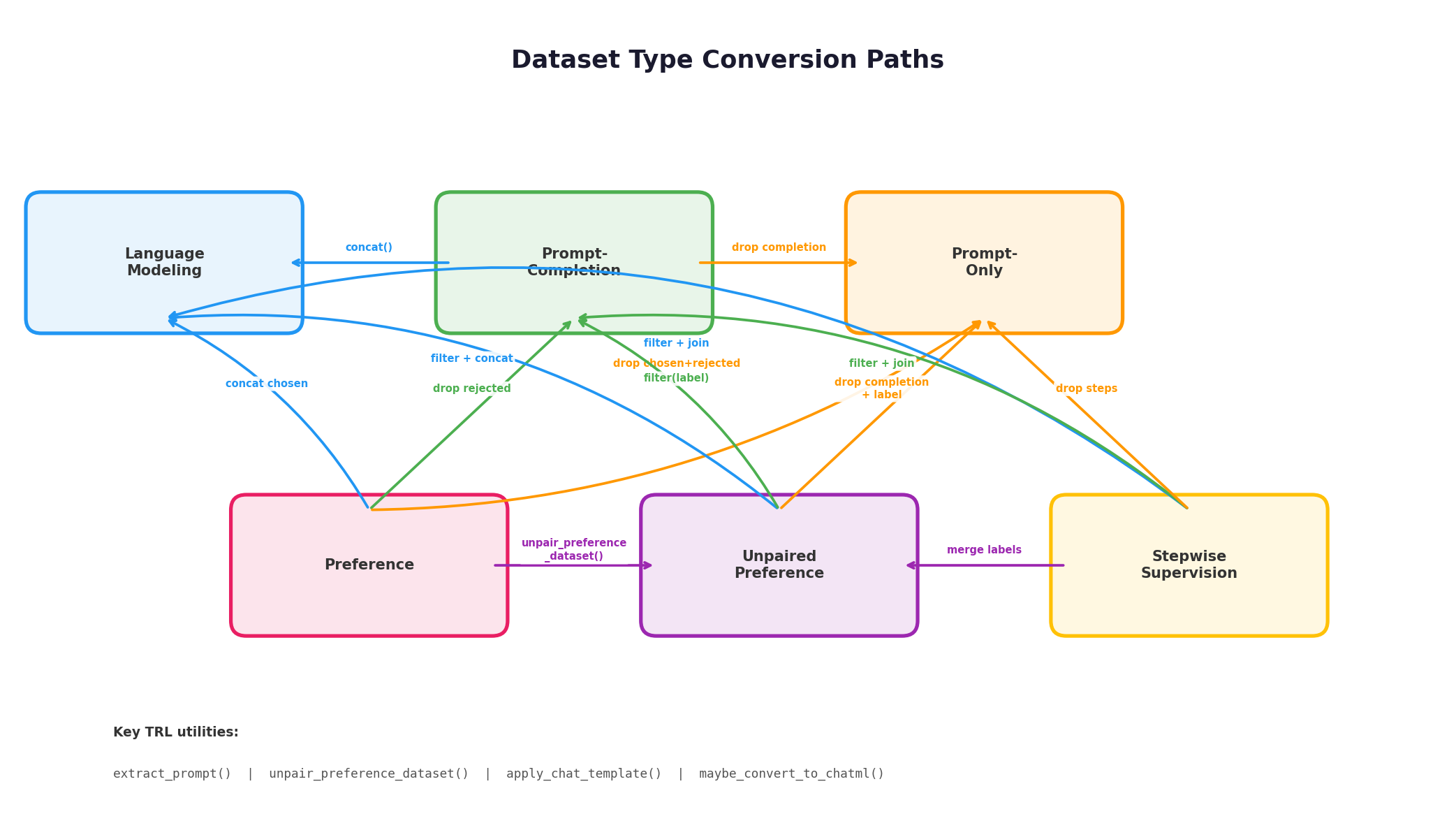
实际项目中,现有数据集的格式往往不能直接匹配目标训练器的要求。TRL 提供了一组工具函数来完成类型之间的转换。
9.1 核心工具函数
| 函数 | 功能 | 典型用途 |
|---|---|---|
extract_prompt | 从隐式 prompt 的 Preference 数据中提取出显式 prompt | 将 implicit prompt 转为 explicit prompt |
unpair_preference_dataset | 将配对偏好数据拆分为非配对格式 | Preference → Unpaired preference |
apply_chat_template | 使用 tokenizer 的聊天模板将对话格式转为标准格式 | Conversational → Standard |
maybe_convert_to_chatml | 将旧式对话格式自动转为 ChatML 标准格式 | 兼容旧数据集 |
is_conversational | 检测数据集是否为对话格式 | 格式判断 |
9.2 常用转换示例
Prompt-completion → Language modeling(拼接 prompt 和 completion):
from datasets import Dataset

dataset = Dataset.from_dict({
    "prompt": ["The sky is", "The sun is"],
    "completion": [" blue.", " in the sky."],
})

def concat_prompt_completion(example):
    return {"text": example["prompt"] + example["completion"]}

dataset = dataset.map(concat_prompt_completion,
                      remove_columns=["prompt", "completion"])
# => {"text": "The sky is blue."}
隐式 prompt Preference → 显式 prompt Preference(使用 extract_prompt):
from datasets import Dataset
from trl import extract_prompt

dataset = Dataset.from_dict({
    "chosen": [
        [{"role": "user", "content": "What color is the sky?"},
         {"role": "assistant", "content": "It is blue."}],
    ],
    "rejected": [
        [{"role": "user", "content": "What color is the sky?"},
         {"role": "assistant", "content": "It is green."}],
    ],
})

dataset = dataset.map(extract_prompt)
# => {"prompt": [{"role": "user", "content": "What color is the sky?"}],
#     "chosen": [{"role": "assistant", "content": "It is blue."}],
#     "rejected": [{"role": "assistant", "content": "It is green."}]}
Preference → Unpaired preference(使用 unpair_preference_dataset):
from datasets import Dataset
from trl import unpair_preference_dataset

dataset = Dataset.from_dict({
    "prompt": [
        [{"role": "user", "content": "What color is the sky?"}],
    ],
    "chosen": [
        [{"role": "assistant", "content": "It is blue."}],
    ],
    "rejected": [
        [{"role": "assistant", "content": "It is green."}],
    ],
})

dataset = unpair_preference_dataset(dataset)
# => {"prompt": [...], "completion": [...], "label": True}
# {"prompt": [...], "completion": [...], "label": False}注意:
unpair_preference_dataset会将chosen标记为label=True、rejected标记为label=False。使用前务必确认你的数据集中所有chosen确实是高质量回答、所有rejected确实是低质量回答。如果偏好标注仅为相对排序(两个都好或两个都差),直接拆分会引入噪声标签。
Stepwise supervision → Unpaired preference(合并步骤标签):
from datasets import Dataset

dataset = Dataset.from_dict({
    "prompt": ["Blue light", "Water"],
    "completions": [
        [" scatters more in the atmosphere,", " so the sky is blue."],
        [" forms ice at 0 degrees,", " which is less dense than liquid water."]
    ],
    "labels": [[True, True], [True, True]],
})

def merge_completions_and_labels(example):
    return {
        "prompt": example["prompt"],
        "completion": "".join(example["completions"]),
        "label": all(example["labels"])  # 全部步骤正确才为 True
    }

dataset = dataset.map(merge_completions_and_labels,
                      remove_columns=["completions", "labels"])
# => {"prompt": "Blue light",
#     "completion": " scatters more in the atmosphere, so the sky is blue.",
#     "label": True}
9.3 转换路径总览
下表展示了各数据类型之间可行的转换路径:
| 源类型 → 目标类型 | Language modeling | Prompt-completion | Prompt-only | Preference | Unpaired preference |
|---|---|---|---|---|---|
| Prompt-completion | concat | — | drop completion | — | — |
| Preference(显式 prompt) | concat chosen | drop rejected | drop chosen+rejected | — | unpair_preference_dataset |
| Preference(隐式 prompt) | rename chosen | extract_prompt + drop rejected | extract_prompt + drop | extract_prompt | extract_prompt + unpair |
| Unpaired preference | filter + concat | filter(label) | drop completion+label | — | — |
| Stepwise supervision | filter + join | filter + join steps | drop steps+labels | — | merge labels |
十、实战:外部数据集的转换流程
以 UltraFeedback 数据集为例,演示如何将非标准格式转换为 TRL 可用的数据。UltraFeedback 原始数据包含多个模型的打分结果(如 Bard、GPT-4)和多个评估维度(helpfulness、honesty 等),格式与 TRL 期望的结构差异很大。
TRL 提供了现成的转换脚本模板。核心转换逻辑通常遵循以下模式:
from datasets import load_dataset, Dataset

# 1. 加载原始数据
raw = load_dataset("openbmb/UltraFeedback", split="train")

# 2. 定义转换函数:根据评分提取最佳和最差回答
def convert_to_preference(example):
    completions = example["completions"]
    # 按 helpfulness 评分排序
    sorted_completions = sorted(
        completions,
        key=lambda x: x["annotations"]["helpfulness"]["Rating"],
        reverse=True
    )
    return {
        "prompt": example["instruction"],
        "chosen": sorted_completions[0]["response"],
        "rejected": sorted_completions[-1]["response"],
    }

# 3. 应用转换
dataset = raw.map(convert_to_preference,
                  remove_columns=raw.column_names)

# 4. 验证结果
print(dataset[0].keys())  # dict_keys(['prompt', 'chosen', 'rejected'])
这种"加载 → 定义映射 → 批量转换 → 验证"的四步流程适用于绝大多数外部数据集的适配。
十一、数据准备 Checklist
在开始训练前,建议按照以下清单逐项检查数据集:
| 检查项 | 说明 |
|---|---|
| 确认目标训练器 | 不同训练器要求不同的数据类型,先查本节的对照表 |
| 检查列名 | TRL 对列名严格匹配(如 text、prompt、chosen、rejected、label),列名错误会导致静默失败或报错 |
| 确认格式一致性 | 同一数据集中所有样本的格式(Standard 或 Conversational)必须统一 |
| 验证对话结构 | Conversational 格式中,每条消息必须包含 role 和 content 字段;role 值通常为 user、assistant、system |
| 处理隐式 prompt | 若偏好数据使用隐式 prompt,DPOTrainer 等需要显式 prompt 的训练器需先调用 extract_prompt 转换 |
| 标签质量审计 | 使用 unpair_preference_dataset 前,确认 chosen/rejected 的标注质量,避免噪声标签 |
| Vision 数据验证 | 图文数据集中 images 列的图像数量须与消息中 {"type": "image"} 的出现次数一致 |
| 工具调用完整性 | Tool Calling 数据集须包含 tools 列,且 JSON Schema 格式正确 |
| 小样本试跑 | 正式训练前用 dataset.select(range(10)) 取少量样本试跑,确认数据可正常加载和处理 |
| Chat template 兼容 | 对话格式数据依赖模型的 chat template,切换模型后需重新验证模板渲染结果 |
本节小结
TRL 的数据体系由格式(Standard / Conversational)和类型(Language modeling / Prompt-only / Prompt-completion / Preference / Unpaired preference / Stepwise supervision)两个维度构成。核心要点:
- 格式选择:纯文本任务用 Standard,对话微调用 Conversational,函数调用训练用 Tool Calling 格式,OpenAI GPT OSS 模型用 Harmony 格式;
- 类型匹配:每种训练器有严格的类型要求——SFT 用 Language modeling 或 Prompt-completion,DPO/Reward 用 Preference,GRPO/RLOO 用 Prompt-only,PRM 用 Stepwise supervision;
- 转换工具:
extract_prompt、unpair_preference_dataset、apply_chat_template三个核心函数覆盖了绝大多数格式转换需求,配合datasets库的map、filter、remove_columns即可完成任意转换; - 数据质量:格式对了只是第一步,标注质量(尤其是偏好数据的 chosen/rejected 区分度)才是训练效果的瓶颈。