
第 3 章 工具注册与分发 —— 给模型一双手
核心原则:Adding a tool means adding one handler. 循环不变,工具可扩展。
Agent loop 本身是一个不变的 while 循环(第 2 章已展开),真正赋予它能力的是注册到循环中的工具集。本章从工具定义的数据格式出发,逐步深入到分发机制、结构化输出强制合规、MCP 上下文爆炸问题的解法,最终给出一套生产级工具系统的设计原则。
3.1 工具定义的 JSON Schema
工具对模型而言只是一段结构化描述。无论 Anthropic 还是 OpenAI 的 API,每个工具都由三要素构成:
| 要素 | 作用 |
|---|---|
name | 唯一标识,dispatch 的 key |
description | 模型选择工具的唯一依据 |
input_schema / parameters | 约束输入格式,直接影响生成质量 |
Anthropic tools format
Anthropic API 将三元组平铺在顶层对象中。input_schema 是标准 JSON Schema:
# Python 实现:Anthropic 工具定义
TOOLS = [
    {"name": "bash", "description": "Run a shell command.",
     "input_schema": {"type": "object", "properties": {"command": {"type": "string"}}, "required": ["command"]}},
    {"name": "read_file", "description": "Read file contents.",
     "input_schema": {"type": "object", "properties": {"path": {"type": "string"}, "limit": {"type": "integer"}}, "required": ["path"]}},
    {"name": "write_file", "description": "Write content to file.",
     "input_schema": {"type": "object", "properties": {"path": {"type": "string"}, "content": {"type": "string"}}, "required": ["path", "content"]}},
    {"name": "edit_file", "description": "Replace exact text in file.",
     "input_schema": {"type": "object", "properties": {"path": {"type": "string"}, "old_text": {"type": "string"}, "new_text": {"type": "string"}}, "required": ["path", "old_text", "new_text"]}},
]
OpenAI function calling format
OpenAI 多包一层 type: "function" + function: {...}:
// Rust 实现:OpenAI 工具定义
fn shell_tool_definition() -> Value {
    json!({
        "type": "function",
        "function": {
            "name": "shell_tool",
            "description": "Run a shell command inside the current workspace.",
            "parameters": {
                "type": "object",
                "properties": {
                    "command": {
                        "type": "string",
                        "description": "The raw shell command to execute."
                    },
                    "workdir": {
                        "type": "string",
                        "description": "Optional relative working directory inside the workspace root."
                    }
                },
                "required": ["command"],
                "additionalProperties": false
            }
        }
    })
}
两种格式的语义完全相同:name 是路由键,description 是模型的"说明书",schema 约束参数结构。实际差异仅在序列化嵌套层级。
description 的质量决定调用成败
description 不是给人读的注释,而是模型在多工具间做选择的唯一信号源。坏的 description 直接导致模型选错工具或传错参数。对比:
| 质量 | 示例 |
|---|---|
| 差 | "Run command" |
| 好 | "Run a shell command inside the current workspace. Use this for inspecting files, editing, building, testing, formatting, git inspection, and other local development tasks." |
好的 description 告诉模型:(1) 做什么 (2) 在什么范围 (3) 适合哪些场景。
3.2 Dispatch Map 模式
工具注册后需要一个分发机制:模型返回工具名,harness 查找并执行对应 handler。最直接的实现是一个字典(或哈希表),O(1) 查找取代 if/elif 链。
Python: dict dispatch
最直接的分发方式是用 TOOL_HANDLERS 字典完成名称到处理函数的映射:
# Python 实现:字典分发
TOOL_HANDLERS = {
    "bash":       lambda **kw: run_bash(kw["command"]),
    "read_file":  lambda **kw: run_read(kw["path"], kw.get("limit")),
    "write_file": lambda **kw: run_write(kw["path"], kw["content"]),
    "edit_file":  lambda **kw: run_edit(kw["path"], kw["old_text"], kw["new_text"]),
}
循环中只需一行查找:
# Python 实现:循环中的工具分发
for block in response.content:
    if block.type == "tool_use":
        handler = TOOL_HANDLERS.get(block.name)
        output = handler(**block.input) if handler else f"Unknown tool: {block.name}"
        results.append({"type": "tool_result", "tool_use_id": block.id, "content": output})
添加新工具 = 写一个 handler 函数 + 往字典加一行 + 往 TOOLS 数组加一条 schema。循环代码零改动。
Rust: match dispatch
Rust 中可以用 match 实现同一模式:
// Rust 实现:match 分发
fn handle_tool_calls(&mut self, tool_calls: Vec<ToolCall>) -> Result<()> {
    for tool_call in tool_calls {
        match tool_call.name.as_str() {
            "shell_tool" => {
                let request = parse_shell_tool_args(&tool_call)?;
                let outcome = self.run_shell(request)?;
                self.history.push_tool(tool_call.id, tool_call.name, outcome.tool_content);
            }
            other => {
                let content = format!("unsupported tool: {other}");
                self.history.push_tool(tool_call.id, tool_call.name, content);
            }
        }
    }
    Ok(())
}
Rust 的 match 在编译期穷举检查,漏掉分支直接报错。当前只有 shell_tool 一个工具,新增工具就是新增 match arm。
架构图
graph LR
    A[User Prompt] --> B[LLM]
    B -->|tool_use / tool_calls| C{Dispatch Map}
    C -->|bash| D[run_bash]
    C -->|read_file| E[run_read]
    C -->|write_file| F[run_write]
    C -->|edit_file| G[run_edit]
    D --> H[tool_result]
    E --> H
    F --> H
    G --> H
H -->|append to messages| B这个模式的不变量:循环结构 + 分发逻辑完全解耦于具体工具实现。无论 4 个工具还是 40 个工具,agent loop 代码不变。
3.3 结构化输出与 Guided Decoding
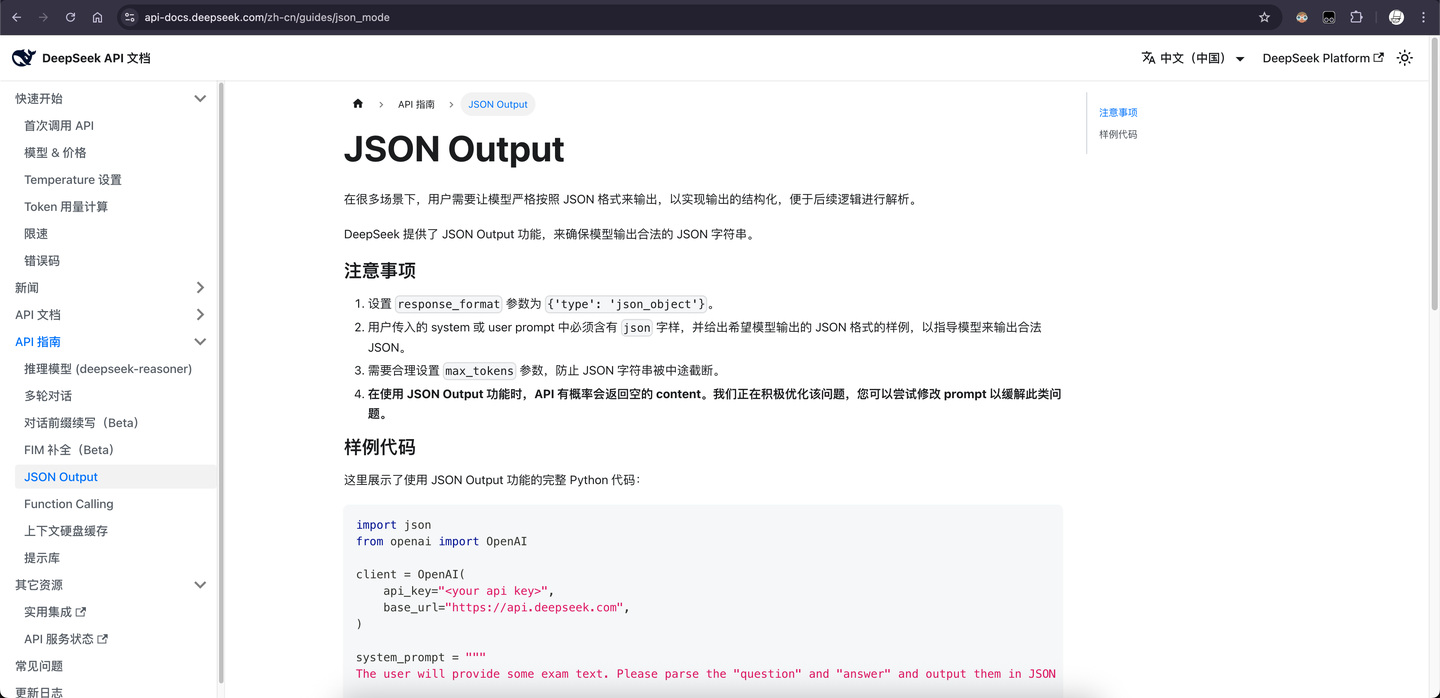
工具调用的前提是模型输出合法的 JSON——工具名和参数必须严格符合 schema。但 LLM 是概率采样的,裸生成可能输出畸形 JSON。结构化输出(Structured Output)就是将输出约束编码为有限状态机(FSM),在每一步 token 采样时 mask 掉不合法的 token。
核心原理
将用户定义的输出约束(JSON Schema、正则表达式、BNF 文法)编译为 FSM,模型每生成一个 token 时,FSM 给出当前状态下合法的 token 集合,不在集合中的 token 的 logit 被设为负无穷。输出 100% 合规,零后处理解析失败。
开源实现以 xgrammar 为代表,被 vLLM、SGLang、TensorRT-LLM 等主流推理框架采用为 guided decoding 后端。
vLLM 四种解码模式
vLLM 通过 GuidedDecodingParams 提供四种模式,约束力逐级递增:
1. choice(枚举选择) —— 输出只能是预定义选项之一:
# Python 实现:choice 模式
params = GuidedDecodingParams(choice=['yes', 'no'])
sampler = SamplingParams(guided_decoding=params)
outputs = llm.generate(prompts=prompt, sampling_params=sampler)
# 输出保证是 "yes" 或 "no"
2. regex(正则约束) —— 输出匹配给定正则表达式:
params = GuidedDecodingParams(regex=r"\w+@\w+\.com\n")
sampler = SamplingParams(guided_decoding=params, stop=['\n'])
# 输出保证符合邮箱格式
3. json(Schema 约束) —— 输出严格符合 JSON Schema,function calling 的底层机制:
full_schema = {
    "type": "object",
    "properties": {
        "content": {"type": "string"},
        "tool_calls": {
            "type": "array",
            "items": {"anyOf": tool_schemas}
        }
    },
    "required": ["content"]
}
sampler = SamplingParams(
    guided_decoding=GuidedDecodingParams(json=full_schema),
    temperature=0.3, max_tokens=500
)
这就是自部署模型实现 function calling 的方式:将所有工具的 schema 合并为一个大 JSON Schema,guided decoding 保证输出严格匹配。
4. grammar(BNF 文法) —— 最强约束,输出严格符合任意上下文无关文法:
simplified_sql_grammar = """
root ::= select_statement
select_statement ::= "SELECT " column " from " table " where " condition
column ::= "col_1 " | "col_2 "
table ::= "table_1 " | "table_2 "
condition ::= column "= " number
number ::= "1 " | "2 "
"""
param = GuidedDecodingParams(grammar=simplified_sql_grammar)
# 输出保证是合法 SQL(在该 BNF 定义的子集内)
四种模式的关系:choice 是 regex 的特例,regex 可以用 grammar 表达,json schema 本质上也是一种特化的 grammar。
云端 API 的结构化输出
无法直接操作模型 logits 时,有三条路径:
| 方法 | 原理 | 局限 |
|---|---|---|
logit_bias | 提升/降低特定 token 的采样概率 | 只能偏置,不能严格保证;需要知道 token ID |
logprobs + top_logprobs | 返回 top-k token 的概率,客户端侧选择 | 仍是后处理,不保证目标 token 出现 |
| tool calling / function calling | 利用 API 内置的 guided decoding | 最可靠,但受限于 API 支持的 schema 复杂度 |
工具库:instructor
instructor 封装了"通过 tool calling 实现结构化输出"的完整流程:定义 Pydantic model -> 自动生成 tool schema -> 调用 API -> 解析 tool_calls 为类型安全的对象:
# Python 实现:instructor 结构化输出
import instructor
from pydantic import BaseModel
from enum import Enum

class Category(str, Enum):
    PHILOSOPHY = "哲学"
    LITERATURE = "文学"
    SCIENCE = "科学"

class Book(BaseModel):
    name: str
    category: Category
    isbn: str

client = instructor.from_provider("deepseek/deepseek-chat", api_key=api_key)
response = client.chat.completions.create(
    response_model=Book,
    messages=[{"role": "user", "content": "帮我生成随机一本书的内容"}],
)
# response 直接是 Book 实例,类型安全
3.4 MCP Server 视为代码 API
问题:上下文爆炸
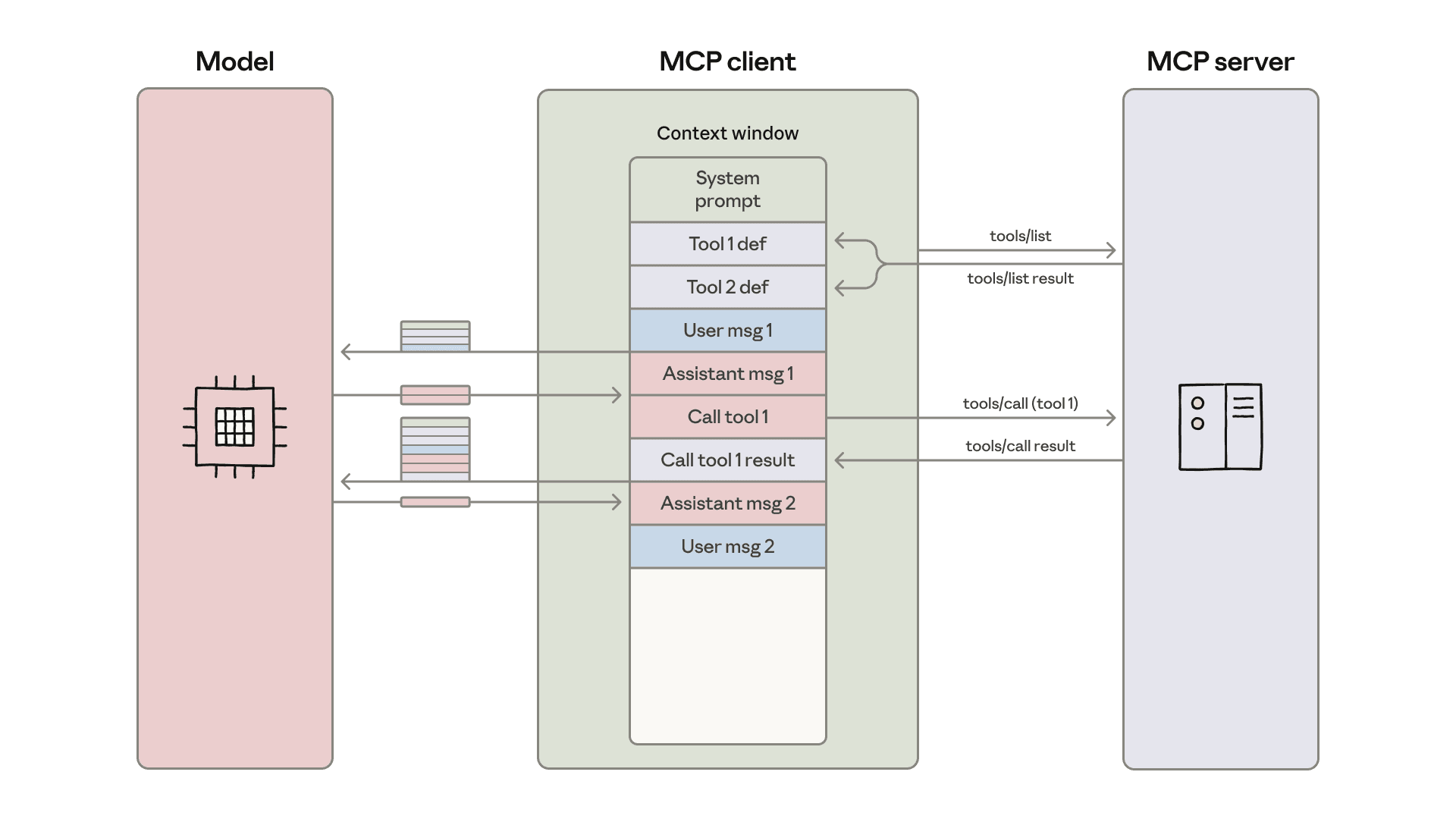
当 Agent 连接大量 MCP server 时,所有工具的 schema 定义会被一次性注入 system prompt,加上每次工具调用的中间结果也进入对话历史,上下文窗口迅速被撑爆。典型场景:连接 5 个 MCP server,每个暴露 20 个工具,光 schema 就消耗数万 token。
方案:Agent 写代码调用工具
Anthropic 提出的解法(原文):不让模型直接调用工具,而是让模型写代码来调用工具。
具体实现:
- 生成文件树:根据连接的 MCP server,为每个工具生成一个描述文件(包含名称、参数、用法示例),组织为文件系统
- 按需加载:Agent 通过
ls/read_file浏览文件树,只加载当前任务需要的工具定义 - 写代码执行:Agent 编写 TypeScript/Python 代码,通过函数调用的方式使用工具,代码在沙箱中执行
效果
| 指标 | 直接调用 | 代码调用 |
|---|---|---|
| Schema token 消耗 | ~150,000 | ~2,000 |
| Token 节省 | - | 98.7% |
| 中间结果处理 | 全部进入上下文 | 留在执行环境 |
四个核心优势
- 按需加载工具:只读取当前需要的工具 schema,而非全量注入
- 数据过滤在执行层:代码内可以 filter/map/reduce,只将最终结果返回模型,中间数据不进入上下文
- 循环/条件逻辑:一次代码执行可以完成"对列表中每个 item 调用工具"这类需要多轮 tool_use 的操作
- 隐私保护:中间结果默认留在执行环境,敏感数据不泄露给模型
3.5 生产级工具系统对比
不同 Agent 框架的工具系统在同一 Dispatch Map 模式上各有侧重。
Codex:工具定义与 sandbox 策略绑定
Codex 的工具系统核心特征是 工具可用性取决于 sandbox 策略。ToolsConfig 持有 SandboxPolicy 引用,在构造工具列表时根据策略动态启用/禁用工具:
// Rust 实现:Codex 工具配置结构体
pub(crate) struct ToolsConfig {
    pub shell_type: ConfigShellToolType,
    pub apply_patch_tool_type: Option<ApplyPatchToolType>,
    pub web_search_mode: Option<WebSearchMode>,
    pub code_mode_enabled: bool,
    pub code_mode_only_enabled: bool,
    pub js_repl_enabled: bool,
    pub collab_tools: bool,
    pub multi_agent_v2: bool,
    pub artifact_tools: bool,
    pub request_user_input: bool,
    pub agent_jobs_tools: bool,
    // ...
}
Codex 区分了 SandboxPolicy::DangerFullAccess、ExternalSandbox 等多种沙箱级别,在 Windows 上还有额外的 WindowsSandboxLevel 约束。工具不是静态列表,而是运行时根据安全策略动态构建。
OpenCode:工具注册表 + 权限标注 + LSP 集成
OpenCode 实现了一套完整的工具注册表系统,根据功能开关动态组装可用工具列表:
// TypeScript 实现:OpenCode 工具注册表
return [
    InvalidTool,
    ...(question ? [QuestionTool] : []),
    BashTool, ReadTool, GlobTool, GrepTool,
    EditTool, WriteTool, TaskTool,
    WebFetchTool, TodoWriteTool,
    WebSearchTool, CodeSearchTool, SkillTool, ApplyPatchTool,
    ...(Flag.OPENCODE_EXPERIMENTAL_LSP_TOOL ? [LspTool] : []),
    ...(cfg.experimental?.batch_tool === true ? [BatchTool] : []),
    ...custom,
]
每个工具通过 Tool.define() 注册,统一接口为 {id, init, description, parameters, execute}:
// TypeScript 实现:OpenCode 工具定义接口
export function define<Parameters extends z.ZodType, Result extends Metadata>(
    id: string,
    init: Info<Parameters, Result>["init"] | Awaited<ReturnType<Info<Parameters, Result>["init"]>>,
): Info<Parameters, Result> { ... }
OpenCode 的三个差异化特征:
- 权限系统:每个工具调用前通过
ctx.ask()请求权限,权限可按模式(pattern)批量授予 - 插件扩展:支持从
{tool,tools}/*.{js,ts}目录自动发现和注册外部工具 - LSP 集成(实验性):通过
LspTool直接调用 Language Server Protocol,获取代码智能(定义跳转、引用查找等)
DeepAgents:8 个内置工具
DeepAgents 以 LangChain 的 StructuredTool.from_function() 注册工具,共 8 个内置工具:
| 工具 | 用途 |
|---|---|
write_todos | 计划管理(todo list) |
ls | 列出目录内容 |
read_file | 读取文件 |
write_file | 写入文件 |
edit_file | 精确替换文件中的文本 |
glob | 按模式搜索文件路径 |
grep | 按正则搜索文件内容 |
execute | 执行 shell 命令 |
此外还有 task 工具用于调用 subagent。工具通过 FilesystemMiddleware 统一管理,backend 可插拔(FilesystemBackend、StateBackend、SandboxBackend 等)。
多框架对比总结
graph TB
    subgraph Python_Agent["教学级 Agent (Python)"]
        PA_D["dict dispatch"]
        PA_T["4 tools: bash / read / write / edit"]
        PA_S["safe_path() 路径约束"]
        PA_D --> PA_T --> PA_S
    end

    subgraph Rust_Agent["轻量级 Agent (Rust)"]
        RA_D["match dispatch"]
        RA_T["1 tool: shell_tool"]
        RA_S["resolve_workdir() + 用户确认"]
        RA_D --> RA_T --> RA_S
    end

    subgraph Codex["Codex (Rust)"]
        CX_D["Registry + Feature flags"]
        CX_T["动态 10+ tools"]
        CX_S["SandboxPolicy 动态启用/禁用"]
        CX_D --> CX_T --> CX_S
    end

    subgraph OpenCode["OpenCode (TypeScript)"]
        OC_D["Registry + Plugin"]
        OC_T["15+ tools + LSP"]
        OC_S["Pattern-based ask 权限"]
        OC_D --> OC_T --> OC_S
    end

    subgraph DeepAgents["DeepAgents (Python)"]
        DA_D["StructuredTool"]
        DA_T["8+1 tools"]
        DA_S["Middleware Backend 隔离"]
        DA_D --> DA_T --> DA_S
    end

    style Python_Agent fill:#fef9e7,stroke:#f9e79f
    style Rust_Agent fill:#eaf2f8,stroke:#aed6f1
    style Codex fill:#fdedec,stroke:#f5b7b1
    style OpenCode fill:#e8f8f5,stroke:#a3e4d7
style DeepAgents fill:#f4ecf7,stroke:#d2b4de| 特性 | 教学级 Agent (Python) | 轻量级 Agent (Rust) | Codex | OpenCode | DeepAgents |
|---|---|---|---|---|---|
| 语言 | Python | Rust | Rust | TypeScript | Python |
| 工具数量 | 4 | 1 | 动态 (10+) | 15+ | 8+1 |
| 分发方式 | dict | match | Registry + Feature flags | Registry + Plugin | StructuredTool |
| 权限系统 | 无 | 用户确认 | SandboxPolicy | Pattern-based ask | Human-in-the-loop |
| 可扩展性 | 手动添加 | 手动添加 | Feature flag 控制 | 插件目录自动发现 | Middleware 注入 |
| 路径沙箱 | safe_path() | resolve_workdir() | Sandbox 容器 | Worktree 限制 | Backend 隔离 |
3.6 工具设计原则
原子性
一个工具做一件事。edit_file 只做文本替换,不顺带格式化。read_file 只读文件,不做内容分析。原子工具让模型的决策空间更小,调用成功率更高。
反面案例:一个 code_edit 工具既能读、又能写、还能 diff——模型不知道该传哪些参数,调用失败率飙升。
可组合性
原子工具之间可以自由组合。read_file -> 分析内容 -> edit_file -> bash("python -m pytest") 是模型自主编排的工具链。工具之间不应有隐式依赖。
自描述性("一句话说清楚" 规则)
工具的 description 应当让模型在不看源码的情况下正确使用。一个好的检验标准:能否用一句话向一个不了解内部实现的人解释这个工具做什么、怎么用、什么时候用。
对比两种 shell 工具的 description:
- 简略版:
"Run a shell command."—— 太简略,模型不知道在哪里运行、能做什么 - 完整版:
"Run a shell command inside the current workspace. Use this for inspecting files, editing, building, testing, formatting, git inspection, and other local development tasks."—— 明确了作用域和适用场景
幂等性
对于读操作(read_file、ls、glob、grep),天然幂等。对于写操作,write_file 是幂等的(同样的输入产生同样的结果),edit_file(精确替换)在目标文本唯一时也是幂等的。幂等性让重试安全,模型可以在不确定结果时重新调用。
友好的错误返回
工具执行失败时,返回结构化的错误信息而非空字符串或异常堆栈。模型需要根据错误信息决定下一步行动。
# Python 实现:友好的错误返回
def run_edit(path: str, old_text: str, new_text: str) -> str:
    try:
        fp = safe_path(path)
        content = fp.read_text()
        if old_text not in content:
            return f"Error: Text not found in {path}"
        fp.write_text(content.replace(old_text, new_text, 1))
        return f"Edited {path}"
    except Exception as e:
        return f"Error: {e}"
"Error: Text not found in {path}" 告诉模型具体失败原因,模型可以据此决定是重新读取文件确认内容还是修改搜索文本。对比直接抛异常——模型收到一堆 traceback,无法做出有意义的决策。